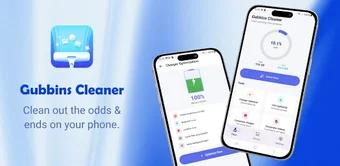
Gubbins Cleaner: Junk Cache simplifies Android storage cleanup and health
Gubbins Cleaner: Junk Cache by CHANG DEV targets routine device maintenance, designed for Android users who need straightforward storage upkeep. The app scans system and app caches, surfaces duplicate photos, and identifies large files to reclaim space quickly while showing storage distribution for decision making. Key tools include a One-Tap cleaner, a storage analyzer, and an app review module for uninstalling unused apps. It suits individuals and small teams managing device storage without technical jargon.
What is Gubbins Cleaner used for?
Gubbins Cleaner is a lightweight Android utility aimed at reclaiming storage and simplifying device upkeep. The app adopts a no-jargon interface so less technical device owners can identify leftover files and temporary data without digging through system settings. It is positioned for regular maintenance tasks on single devices, helping users who face storage limitations or who want a routine way to keep a handset organised.
What can you do with Gubbins Cleaner in daily device maintenance?
The app organizes common cleanup actions into a repeatable workflow and exposes targeted controls for each task. Users can perform:
- Junk Cleaner to scan and remove system and app cache
- Duplicate Photo Cleaner to flag identical or similar images
- Large File Manager to locate bulky videos and downloads
- App Manager to review and uninstall rarely used applications
Those operations support predictable, per-device storage management without external tools.
Is Gubbins Cleaner easy to adopt on a mobile device?
The interface emphasizes simplicity, with a One-Tap cleaning option that reduces steps and multi-language support to broaden accessibility. Deletions require user confirmation, which protects important files but introduces an extra review action into the workflow. Onboarding needs little prior expertise, and the storage view uses clear categories so staff or individuals can make decisions about removals without formal training.
How does Gubbins Cleaner handle large media and storage analysis?
Storage analysis presents a categorized layout that highlights apps, photos, videos, and documents so users can target the biggest space consumers. Scans flag high-capacity media and suggest candidates for review rather than performing blind purges, and the duplicate-photo routine identifies similar images for manual clearance. The app also shows battery information, letting users pair simple health checks with storage tasks on modern Android devices.
Who should adopt Gubbins Cleaner and who should look elsewhere
Gubbins Cleaner is a practical option for individual mobile users and small teams that need straightforward, per-device maintenance and periodic space recovery. It does not emphasise cloud collaboration or centralized device management, which limits its suitability for organizations that require shared workflows or audit trails. As a newer entry, it fits situations where quick, local cleanup matters more than enterprise device control.